ASCII art is a unique form of digital art that uses characters from the ASCII (American Standard Code for Information Interchange) set to create images and designs. This article explores the origins of ASCII art, its techniques, and its continued relevance in the digital age.
What Is ASCII Art?
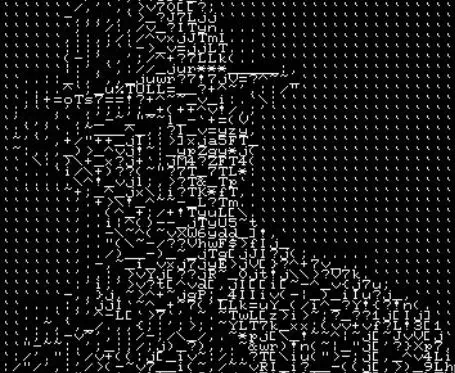
ASCII art involves creating images and designs using characters from the ASCII character set. This set includes letters, numbers, punctuation marks, and other symbols.
- Definition: ASCII art is a visual art form where images are created using the characters available in the ASCII set. Unlike traditional art, which uses paint or pencils, ASCII art relies on text characters to represent visual elements.
- History: ASCII art dates back to the early days of computing, when graphical displays were limited or non-existent. Early computer users used text-based characters to create images, developing a unique art form that persisted even as technology advanced.
Techniques and Tools
Creating ASCII art requires a combination of creativity and technical skill. Here are some essential techniques and tools used in ASCII art:
- Character Selection: ASCII art uses different characters to represent varying levels of shading and texture. For example, characters like
@,#, and.are often used to create contrast and detail. - Grid Layout: Artists often use a grid layout to arrange characters in a way that forms an image. This grid helps ensure that the proportions and details of the art are consistent.
- Monospaced Fonts: To maintain alignment and spacing, ASCII art is typically created using monospaced fonts, where each character occupies the same amount of space. This consistency is crucial for maintaining the visual integrity of the art.
- Editing Software: While ASCII art can be created using simple text editors, there are specialized tools and software designed for ASCII art. These tools provide features like grid overlays and character mapping to assist artists in their work.
Popular ASCII Art Styles
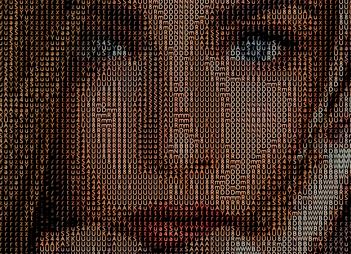
Several styles and techniques have emerged within the realm of ASCII art, each with its own characteristics and methods:
- Basic ASCII Art: This style uses simple characters to create straightforward images. It’s often used for small designs or simple representations.
- Complex ASCII Art: More intricate designs involve a wider range of characters and more detailed arrangements. These pieces can be highly detailed and resemble traditional artwork.
- ASCII Animations: Some artists create animated ASCII art by sequencing multiple frames. These animations can be displayed in a text-based format or converted into other media.
- Art in Code: ASCII art is sometimes embedded in programming code or scripts, where it serves as both decoration and a functional component. This practice is common in software development and coding communities.
ASCII Art in Popular Culture
ASCII art has made its mark in various areas of popular culture:
- Early Internet Culture: ASCII art was prevalent in early internet forums, email signatures, and online communities. It provided a creative outlet for users when graphical capabilities were limited.
- Video Games: Some early video games used ASCII art for graphics due to hardware constraints. This style has been embraced by indie game developers who seek a retro aesthetic.
- Digital Art and Memes: ASCII art has influenced modern digital art and meme culture. Its unique visual style is often used for humorous or nostalgic purposes.
Creating Your Own ASCII Art
If you’re interested in creating your own ASCII art, here are some steps to get started:
- Choose Your Subject: Decide on the image or design you want to create. Start with simple shapes or objects to get familiar with the process.
- Sketch Your Design: Create a rough sketch of your design using a text editor or grid paper. This will serve as a guide for arranging characters.
- Select Characters: Experiment with different characters to achieve the desired shading and texture. Use characters like
*,+, and-to add details and depth. - Refine Your Art: Review and refine your design by adjusting character placement and experimenting with different fonts and styles.
- Share and Enjoy: Once you’re satisfied with your creation, share it with others or use it in your digital projects. ASCII art can be a fun and unique way to express creativity.
The Future of ASCII Art
Despite advances in digital technology, ASCII art continues to have a place in modern digital culture:
- Nostalgia and Retro Appeal: ASCII art’s retro charm appeals to those who appreciate the early days of computing and the creativity required to produce art with limited resources.
- Educational Tool: ASCII art is used as an educational tool to teach concepts related to text processing, character encoding, and digital art creation.
- Artistic Expression: Contemporary artists continue to explore ASCII art as a medium for artistic expression, blending it with other digital art forms to create innovative and engaging works.
The Timeless Appeal of ASCII Art
ASCII art represents a unique and enduring form of digital creativity. Its history, techniques, and continued relevance highlight its significance in the evolution of digital art and culture. Whether you’re a seasoned artist or a curious beginner, exploring ASCII art offers a fascinating glimpse into a creative tradition that continues to inspire and captivate.